
Connect
Ahrefs connection guide: connect, see your data, revoke
TL;DR
Agent Planners connects to Ahrefs through Ahrefs Connect (OAuth 2.0 with PKCE, one permission: apiv3-integration-apps). Each person connects their own Ahrefs account; every call uses that account's API units and says how many. Ahrefs is in a pilot: it is open to selected workspaces while Ahrefs reviews Agent Planners for Ahrefs Connect, and until Ahrefs activates the app only Ahrefs' free test queries run (ahrefs.com, yep.com and firehose.com as targets; ahrefs, yep and firehose as keywords).
1. Before connecting
- 1Sign in to Agent Planners and open Integrations → the Ahrefs card.
- 2The card says Not connected and offers Connect Ahrefs (workspace admins and editors). You need a paid Ahrefs plan — Lite, Standard, Advanced or Enterprise.
2. Press Connect Ahrefs and sign in to Ahrefs
- 1Press Connect Ahrefs. Agent Planners sends you to Ahrefs (app.ahrefs.com) — your Ahrefs password is never typed into Agent Planners.
- 2Sign in to Ahrefs if you are not signed in already.
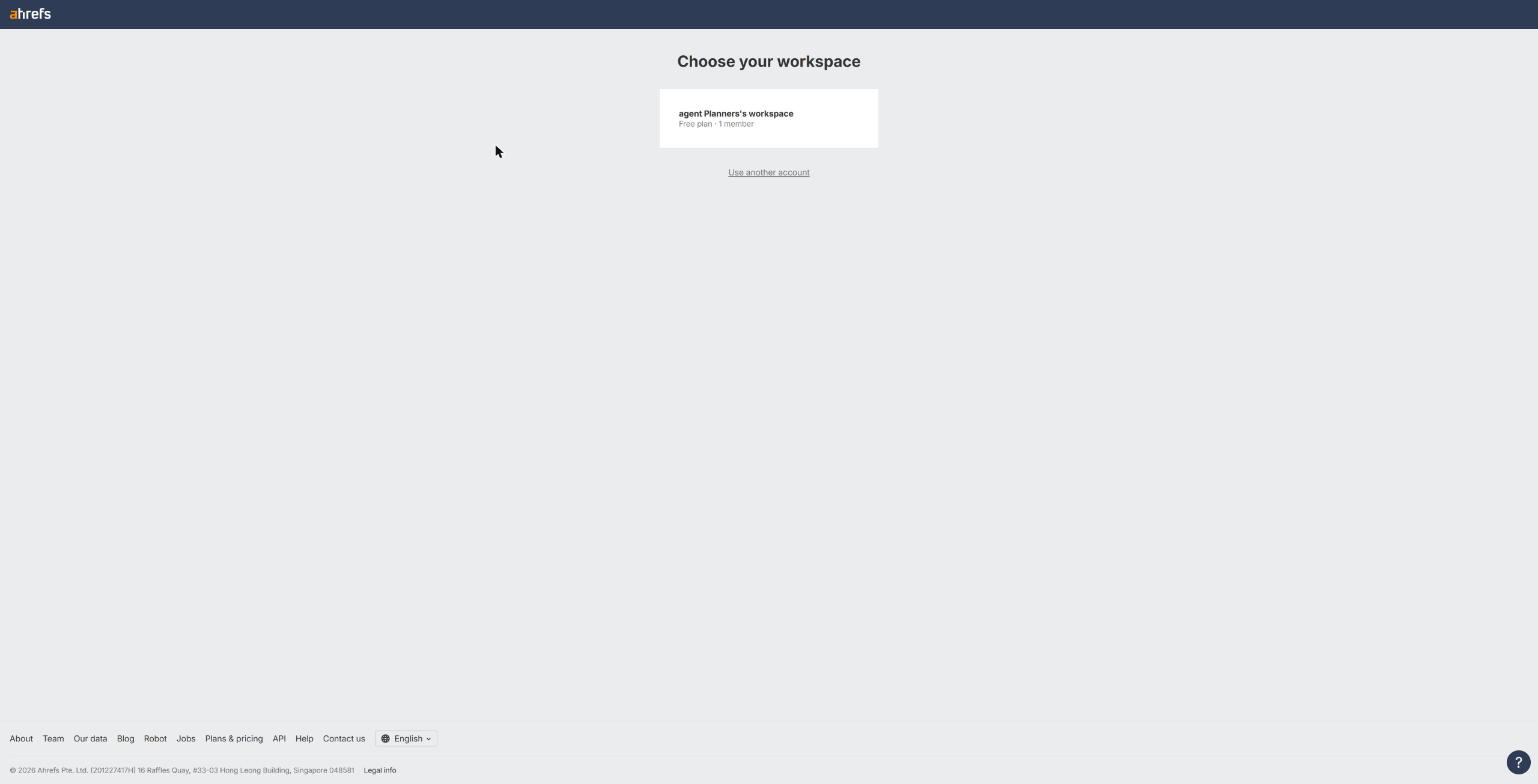
3. Approve access on Ahrefs' consent screen
- 1Ahrefs shows its consent screen for Agent Planners. Press the button to authorize.
- 2Ahrefs returns you to Agent Planners. Our server exchanges the one-time code for the access token (PKCE + the app's secret, server-side) and reads your plan and units (subscription-info/limits-and-usage, a free call).
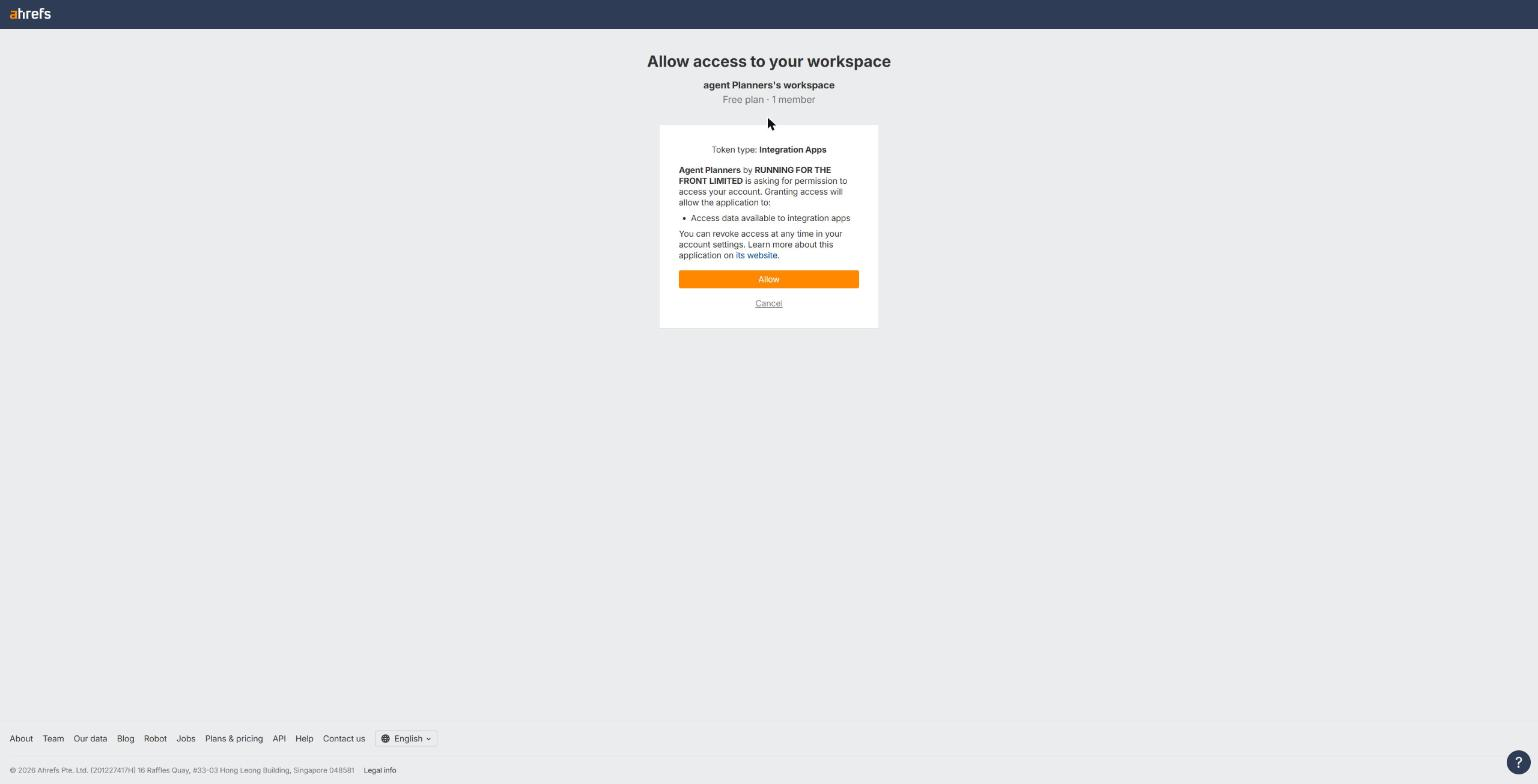
4. Your account after connecting
- The card now says Connected · Ahrefs plan: <plan> · sign-in valid until <date> and shows this month's API units (used of the limit, the reset date, and this app's cap if your Ahrefs admin set one).
- The connection is yours: teammates connect their own Ahrefs accounts. Connecting again updates your connection in place.
- An Ahrefs sign-in lasts one year and cannot be renewed by an app; the card asks you to Re-authorize when it ends.

5. How the agent shows Ahrefs data
- 1Ask in the Workspace, for example: “Get the Domain Rating, backlink counts and top 10 organic keywords of ahrefs.com, and the keyword overview and SERP for “ahrefs” in the US.”
- 2The agent plans its Ahrefs reads, runs them on your connection and writes a report with tables. Every Ahrefs step shows the API units it spent (0 when Ahrefs served it from its cache) next to the data.
- 3Ahrefs numbers are labelled as Ahrefs' estimates; money fields (CPC, traffic value) arrive from Ahrefs in US cents, and every answer tells the agent so before it reports dollars.

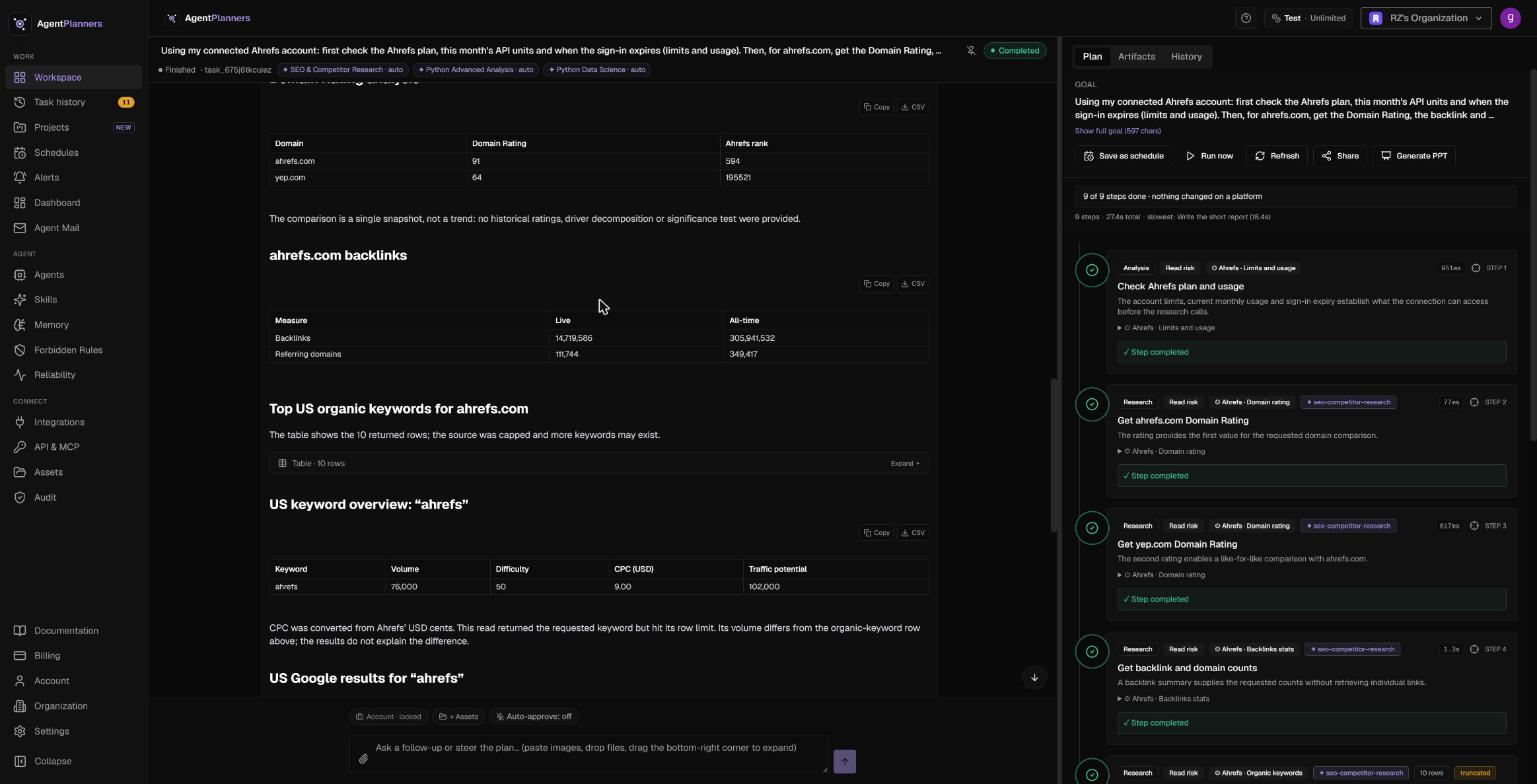
Ahrefs data in a finished task
- The report summarizes the findings; each table (backlinks, organic keywords, SERP) can be downloaded as CSV.
- Opening a step shows its exact answer, including
ahrefsUnits(rows, units charged, cache) andagentPlannersCredits— the two meters side by side.
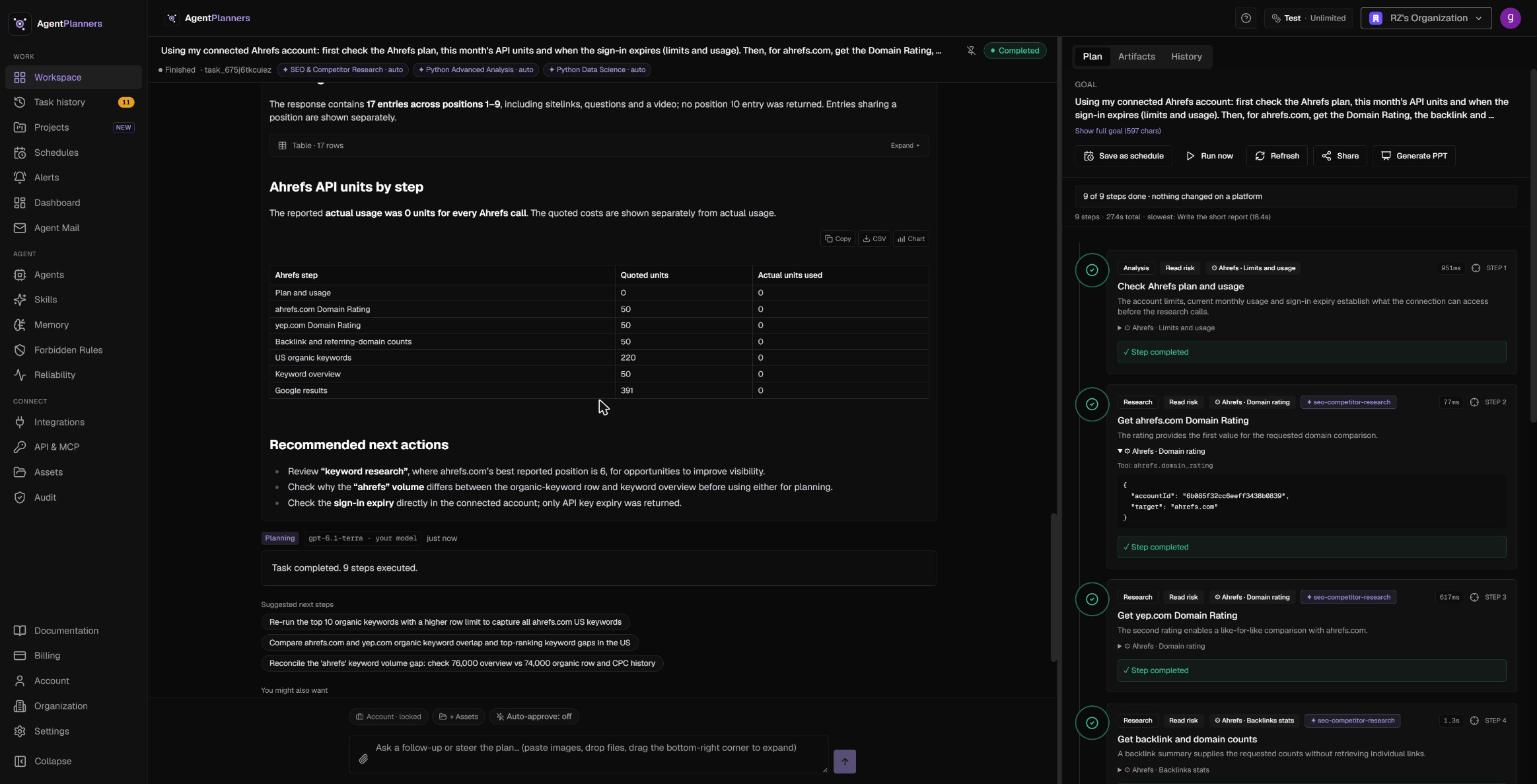
Units shown per call
ahrefsUnits.costActualis what Ahrefs charged your plan for that call;cache: "hit"means it cost nothing.agentPlannersCreditsis Agent Planners' own charge for the call — a different meter (see below).
6. Revoke access
- 1In Agent Planners: on the Ahrefs card press the bin icon on your connection and confirm. Our copy of the sign-in is deleted at once; tasks, schedules and dashboards that used it stop.
- 2In Ahrefs: open Account settings → Applications and revoke Agent Planners. Ahrefs offers apps no revocation endpoint, so this is where the sign-in itself is ended. Your Ahrefs admin can also cap the app's monthly units there.
- 3Do both to fully disconnect. The card returns to Not connected.
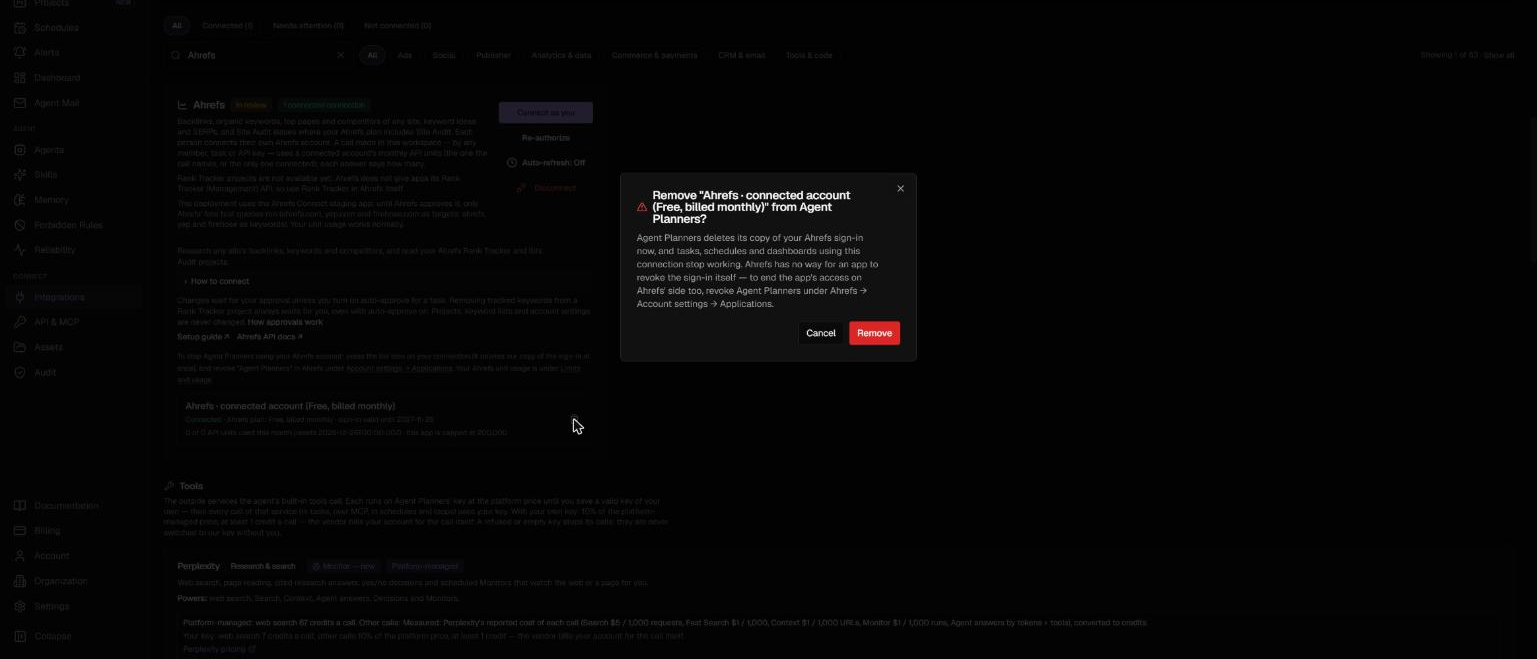
Revoking in Ahrefs
- Ahrefs lists Agent Planners under Account settings → Applications; its API key is labelled “Integration app”. Unit usage: Limits and usage.
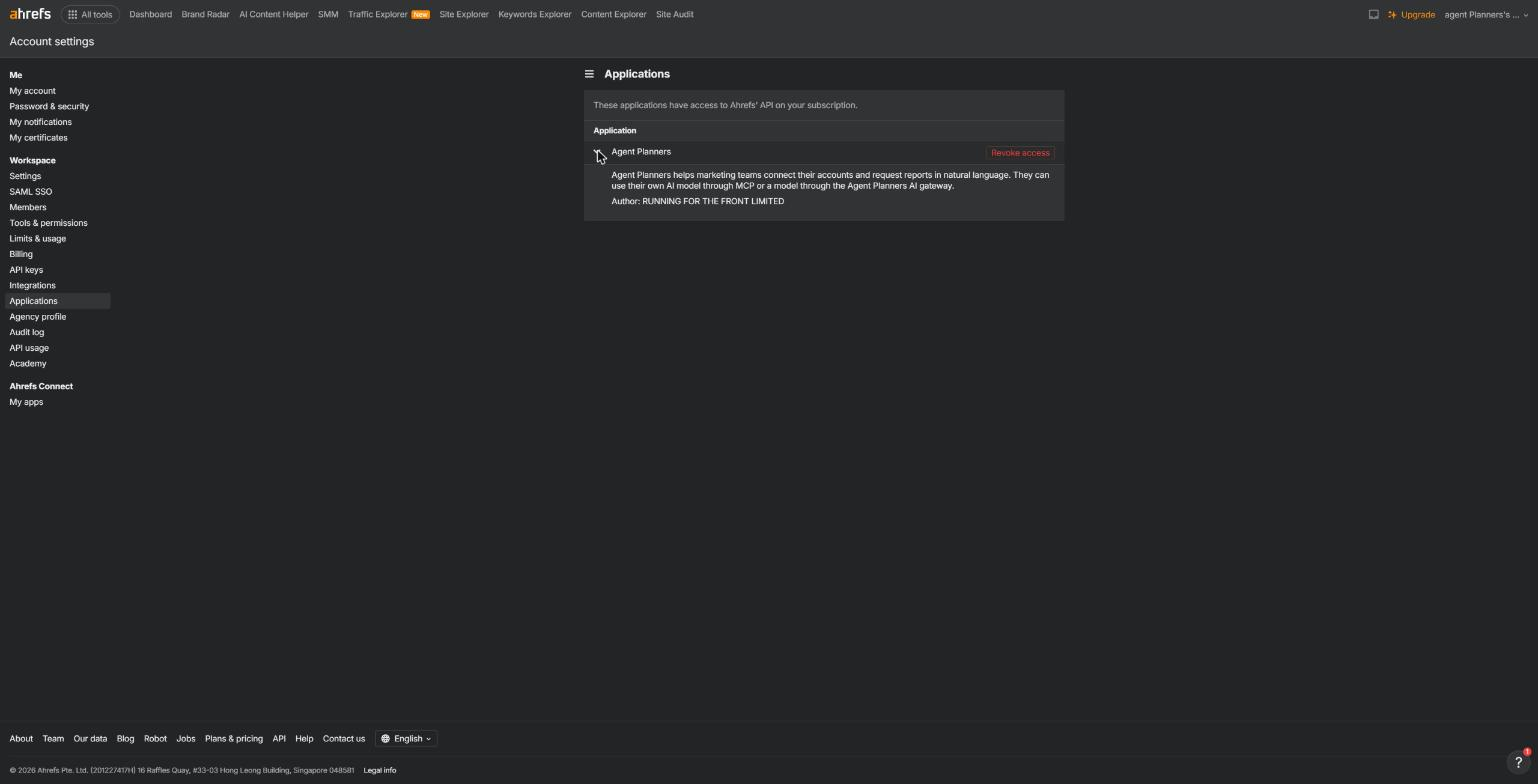
After revoking
- The Ahrefs card shows Not connected again. Nothing of your Ahrefs sign-in remains in Agent Planners.
What Agent Planners stores — and the access token
- The authorization code is exchanged on our server (PKCE S256 + the client secret, which never leaves the server).
- The access token is stored encrypted (AES-256-GCM) on the connection record and decrypted only on the server for the request to api.ahrefs.com.
- No page, API answer, MCP / REST answer, log line, URL or e-mail contains the token: the accounts API strips credentials, tool answers carry only data and units, and errors are rewritten without the Authorization header.
- Disconnect / Remove deletes the stored token at once; revoking in Ahrefs (Account settings → Applications) ends it on Ahrefs' side.
- Stored with the connection: the encrypted token, its expiry, which Ahrefs Connect app issued it, and your plan / unit figures from limits-and-usage. Ahrefs data from tasks is kept with the task like any other task result (deleted under the workspace's retention settings).
Endpoints used, data retrieved and unit cost
| Endpoint | Tool | Data retrieved | Used for | Ahrefs units (default call) |
|---|---|---|---|---|
| GET subscription-info/limits-and-usage | ahrefs.limits_and_usage | Plan name, monthly unit limit and usage, this app's unit cap and usage, reset date, the sign-in's expiry | Shows the connected account's status on the Integrations card and before costly research | Free |
| GET site-explorer/domain-rating | ahrefs.domain_rating | Domain Rating and Ahrefs Rank of a site on a date | Quick authority check of a site or competitor | 2 units a row × 1 row → 50 (min 50) |
| GET site-explorer/metrics | ahrefs.site_metrics | Organic / paid keywords, traffic and traffic value | Size up a site's search visibility | 44 units a row × 1 row → 50 (min 50) |
| GET site-explorer/backlinks-stats | ahrefs.backlinks_stats | Live and all-time backlink and referring-domain counts | Link-profile summary before deeper backlink reads | 12 units a row × 1 row → 50 (min 50) |
| GET site-explorer/all-backlinks | ahrefs.backlinks | Individual backlinks (source, target, anchor, source DR, traffic, dofollow, first / last seen) | Link audits and outreach research | 17 units a row × 50 rows → 850 (min 50) |
| GET site-explorer/refdomains | ahrefs.refdomains | Referring domains with their DR and link counts | Which sites link to a domain | 6 units a row × 50 rows → 300 (min 50) |
| GET site-explorer/anchors | ahrefs.anchors | Anchor texts and how many domains use them | Anchor-text distribution checks | 10 units a row × 50 rows → 500 (min 50) |
| GET site-explorer/organic-keywords | ahrefs.organic_keywords | Keywords a site ranks for, with position, volume, traffic, difficulty, CPC | Content and keyword-gap research | 34 units a row × 50 rows → 1,700 (min 50) |
| GET site-explorer/top-pages | ahrefs.top_pages | A site's pages by organic traffic and their top keyword | Find a site's best-performing content | 24 units a row × 50 rows → 1,200 (min 50) |
| GET site-explorer/organic-competitors | ahrefs.organic_competitors | Sites competing for the same keywords | Identify search competitors | 15 units a row × 50 rows → 750 (min 50) |
| GET site-explorer/metrics-history | ahrefs.metrics_history | Organic / paid traffic and value over time | Trend reports | max(50, field costs × rows) — depends on the fields asked |
| GET site-explorer/domain-rating-history | ahrefs.domain_rating_history | Domain Rating over time | Authority trend reports | 2 units a row × 12 rows → 50 (min 50) |
| GET keywords-explorer/overview | ahrefs.keywords_overview | Volume, difficulty, CPC, traffic potential, intent of given keywords | Keyword evaluation for content and ads | 53 units a row × 1 row → 53 (min 50) |
| GET keywords-explorer/matching-terms | ahrefs.matching_terms | Keyword ideas containing the seed terms | Keyword ideation | 33 units a row × 50 rows → 1,650 (min 50) |
| GET keywords-explorer/related-terms | ahrefs.related_terms | Related keyword ideas | Keyword ideation | 33 units a row × 50 rows → 1,650 (min 50) |
| GET keywords-explorer/search-suggestions | ahrefs.search_suggestions | Search-box suggestions for the seeds | Keyword ideation | 32 units a row × 50 rows → 1,600 (min 50) |
| GET keywords-explorer/volume-history | ahrefs.keyword_volume_history | Monthly search volume of one keyword | Seasonality checks | 2 units a row × 12 rows → 50 (min 50) |
| GET serp-overview/serp-overview | ahrefs.serp_overview | The Google results page for one keyword with each result's metrics | Who ranks for a keyword and how strong they are | 23 units a row × 10 rows → 230 (min 50) |
| GET management/projects | ahrefs.list_projects | The account's Rank Tracker projects | Pick a project to report on | Free |
| GET management/project-keywords | ahrefs.list_project_keywords | Keywords tracked in one project | Rank Tracker reporting | Free |
| GET management/project-competitors | ahrefs.list_project_competitors | Competitors of one project | Rank Tracker reporting | Free |
| GET rank-tracker/overview | ahrefs.rank_tracker_overview | Tracked positions and their change | Weekly rank reports | Free |
| GET rank-tracker/competitors-overview | ahrefs.rank_tracker_competitors | Competitors' positions on tracked keywords | Competitive rank reports | Free |
| GET site-audit/projects | ahrefs.site_audit_projects | Site Audit projects with health score and issue counts | Technical SEO status | Free |
| GET site-audit/issues | ahrefs.site_audit_issues | Issues a crawl found and pages affected | Technical SEO fix lists | 50 units a request |
| GET site-audit/page-explorer | ahrefs.site_audit_pages | Crawled pages (optionally with one issue) | Technical SEO fix lists | 50 units a request |
| POST batch-analysis/batch-analysis | ahrefs.batch_analysis | DR, backlinks, referring domains and organic metrics for up to 100 targets in one request | Compare many sites at once (cheaper than one call each) | 29 units a row × 1 row → 50 (min 50) |
| PUT management/project-keywords | ahrefs.add_project_keywords | (write) adds keywords to a Rank Tracker project | Start tracking keywords a task found — follows the approval setting | Free |
| PUT management/project-keywords-delete | ahrefs.remove_project_keywords | (write) removes tracked keywords and their history | Stop tracking keywords — always a person's decision | Free |
Unit costs come from each endpoint's own price in Ahrefs' API reference (field costs, minimum 50 a paid request); the agent asks only the default fields unless a step needs others, and every answer reports the units Ahrefs actually charged. The Traffic Analytics add-on is never called.
How API units are conserved
- Only the fields a step needs: every list endpoint has a short default
select(listed per endpoint) — Ahrefs prices a row by the fields asked for. - Few rows by default: list reads return ≤ 50 rows unless the step asks for more (cap 1,000); an answer that hits its limit says so and tells the agent to narrow the filter rather than raise the limit.
- One request for many sites: batch analysis covers up to 100 targets in a single call instead of one call each.
- Free endpoints first: the account's plan and usage (limits-and-usage), Rank Tracker and project lists cost no units; the agent reads usage before large research.
- No repeated calls: a step's answer is reused by later steps of the same task (it is passed on, not fetched again); a change is never sent twice; a read is retried only when Ahrefs answered 429 / 5xx (nothing was returned).
- Every answer reports the units it spent (Ahrefs' x-api-units-cost-total-actual and x-api-cache headers) — the agent and the person see the cost of each step; an Ahrefs cache hit costs nothing and is shown as such.
- Bad arguments never reach Ahrefs: dates, targets, project ids, paths and required fields are checked before any request is sent.
- The Ahrefs workspace admin can cap this app's monthly units (Ahrefs → API keys → the "Integration app" key); the Integrations card shows the cap and the month's usage.
Ahrefs API units vs Agent Planners credits
| Operation | Agent Planners credits | How |
|---|---|---|
| An Ahrefs step inside a task (web app, schedule, project, loop) | 0 credits for the Ahrefs call itself | The task's model usage is billed as for any task. Ahrefs bills Agent Planners nothing for your call. |
| An Ahrefs read over MCP / REST (Claude, Codex, your own system) | 7 credits per call | The flat MCP / REST read charge, billed once after the call has run (one ledger row per call). |
| An Ahrefs change over MCP / REST (Rank Tracker keywords) | 34 credits per call | The flat MCP / REST write charge, billed once when the change runs (a change waiting for approval costs nothing until it runs). |
| A call that is refused, held for a person, or fails | 0 credits | Nothing is charged for a call that did not run successfully. |
| Ahrefs API units | From your Ahrefs plan | Every answer reports the units Ahrefs charged your account (0 for a cache hit or a free endpoint). Agent Planners never converts or resells units. |
Two separate meters. Ahrefs API units come from the connected person's own Ahrefs plan — Ahrefs charges them for every paid request, shows them in Ahrefs → Account settings → Limits and usage, and each Agent Planners answer reports how many a call used. Agent Planners credits come from your Agent Planners workspace: no per-call charge for an Ahrefs step inside a task (only the task's model usage), and the flat per-call MCP / REST charge when an external agent or system calls an Ahrefs tool. Test and staging connections follow exactly the same rules; nothing is free or charged twice because it is a test.
Frequently asked questions
- Does Agent Planners ever show my Ahrefs token?
- No. The token is exchanged and stored encrypted on the server; no page, API answer, log or e-mail contains it.
- Who pays for Ahrefs API units?
- The connected Ahrefs account's own plan. Agent Planners credits are a separate meter for Agent Planners itself.
- How do I revoke access?
- Remove the connection on the Ahrefs card (deletes our copy at once) and revoke Agent Planners under Ahrefs → Account settings → Applications.
- Which redirect URI does the app use?
- https://www.agentplanners.com/api/oauth/ahref/callback